Phase 5: Install Argo CD and enable GitOps
Purpose
Make Git the source of truth for the application. GitHub Actions creates the image and updates the manifest; Argo CD runs inside Kubernetes, reads that manifest from Git, and reconciles the cluster.
This pull model means GitHub Actions never receives a cluster-admin kubeconfig.
1. Install the pinned Argo CD release
On the control-plane node, create the namespace and apply the upstream manifest for the version used in the lab:
kubectl create namespace argocd

kubectl apply --server-side --force-conflicts \
  -n argocd \
  -f https://raw.githubusercontent.com/argoproj/argo-cd/v3.5.3/manifests/install.yaml
The version is pinned so a rebuild does not silently install a different release. Before rebuilding in the future, review the current supported Argo CD release and upgrade notes.
2. Wait for the installation
kubectl wait --for=condition=Available deployment --all \
  -n argocd \
  --timeout=300s

kubectl get pods -n argocd -o wide
kubectl get deployment,statefulset,service -n argocd
All long-running Argo CD Pods should become Running and ready. If the wait times out:
kubectl get pods -n argocd
kubectl describe pod <argocd-pod-name> -n argocd
kubectl get events -n argocd --sort-by='.lastTimestamp'
kubectl logs <argocd-pod-name> -n argocd
Do not continue to the Application object until the Argo CD controllers and API server are healthy.
3. Retrieve the initial login securely
Argo CD stores the generated initial administrator password in a Kubernetes Secret. Display it only in the terminal where it will be used:
kubectl -n argocd get secret argocd-initial-admin-secret \
  -o jsonpath='{.data.password}' | base64 -d; echo
The username is admin. The password was not copied to Git, the journal, or a
screenshot. After changing the administrator password, the bootstrap Secret can
be removed according to the Argo CD guidance.
4. Reach the UI without exposing it
Argo CD was not changed to a public LoadBalancer or NodePort Service.
Instead, run this on the control-plane node:
Leave that terminal running. From the Debian management VM, create an SSH tunnel to the loopback listener on the control plane:
Open this on the Debian VM or a browser using that local tunnel:
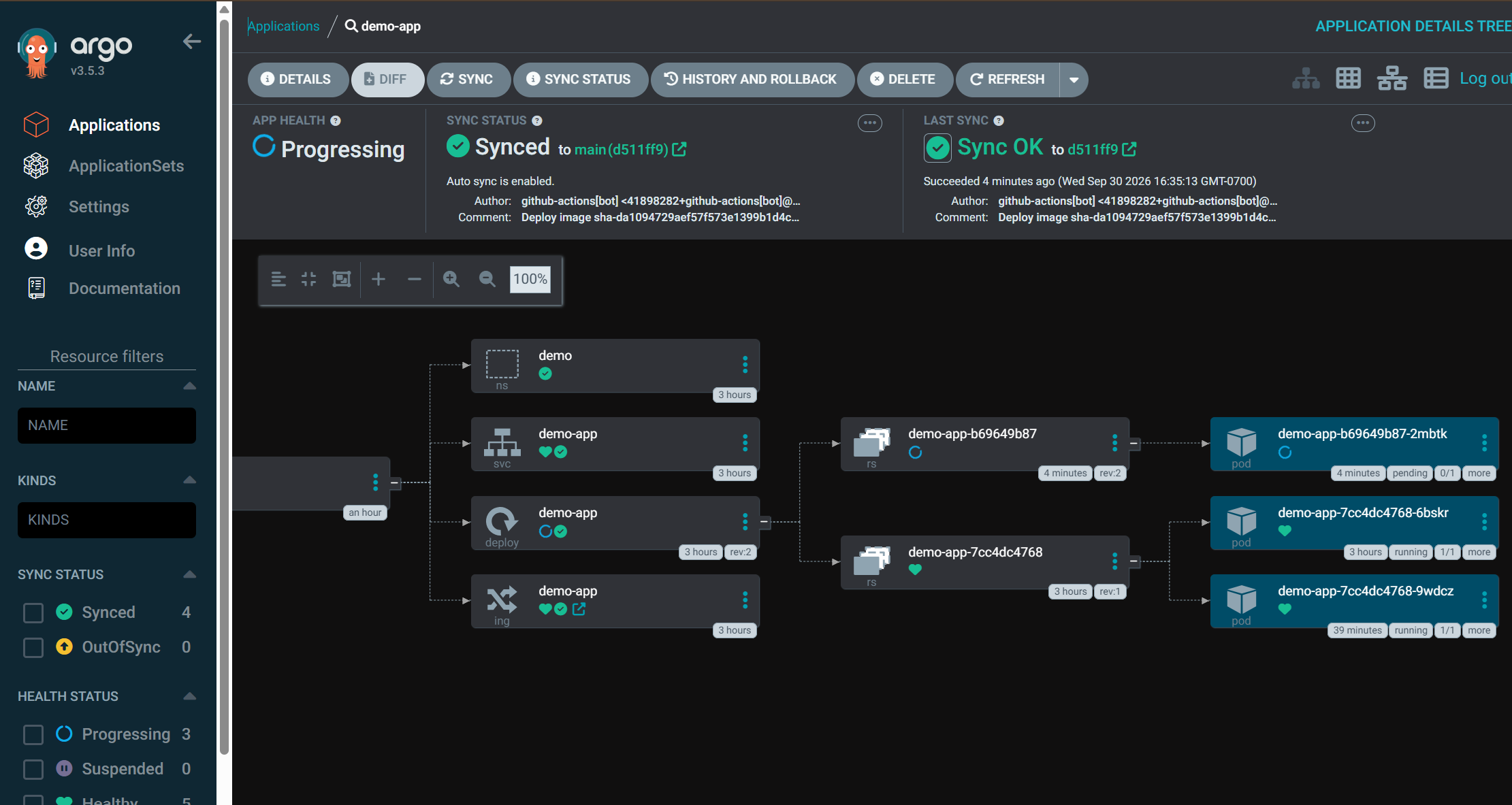
The self-signed certificate warning is expected in this temporary tunnel. Sign
in with admin and the generated password, then change the password.
If local port 8080 is already occupied, use another local port while leaving
the remote side at 8080, for example:
Then use https://localhost:8443.
5. Review the Application definition
argocd/application.yaml defines:
| Setting | Lab value and meaning |
|---|---|
| Source repository | Public k8s-cicd-lab Git repository |
| Revision | main |
| Source path | k8s |
| Destination server | Current Kubernetes cluster |
| Destination namespace | demo |
| Automated sync | Apply Git changes without pressing Sync |
| Prune | Delete Argo-managed objects removed from Git |
| Self-heal | Restore managed fields changed directly in the cluster |
CreateNamespace=true |
Permit namespace creation if required |
PruneLast=true |
Apply replacements before destructive pruning |
allowEmpty: false |
Do not accept an accidentally empty application |
The repository is public, so no Argo CD repository credential was needed. A private repository would require an SSH deploy key or another narrowly scoped repository credential stored in Argo CD, not in the application manifests.
6. Register the application
From the repository checkout on the control-plane node:
Watch the Application and the resources it controls:
In another terminal:
Healthy steady state is:
Use these commands for more detail:
kubectl describe application demo-app -n argocd
kubectl get application demo-app -n argocd -o yaml
kubectl get events -n argocd --sort-by='.lastTimestamp'
7. Understand the two status columns
Synced means the live Kubernetes object definitions match the desired state
rendered from Git. Healthy means those objects are operating as Argo CD
expects.
Possible combinations include:
| Sync | Health | Meaning |
|---|---|---|
| Synced | Healthy | Git matches the cluster and the workload is ready |
| OutOfSync | Healthy | The old/live workload may still work, but it differs from Git |
| Synced | Progressing | The requested change is applied and still rolling out |
| Synced | Degraded | Git was applied, but the workload cannot reach healthy state |
This distinction explained the failed rollout in Phase 6.
8. Test self-healing
Git declares two replicas. Introduce drift manually:
kubectl scale deployment/demo-app -n demo --replicas=1
kubectl get deployment demo-app -n demo --watch
Argo CD notices that the live Deployment says one while Git says two and restores the Deployment specification to two. The Kubernetes Deployment controller then creates the missing Pod.
Confirm both layers:
Self-healing does not mean Argo CD detected a failed worker VM and powered it back on:
- Argo CD repairs Git-to-Kubernetes configuration drift.
- The Deployment controller replaces missing Pods on eligible nodes.
- The kubelet manages containers on its node.
- Proxmox, the guest OS, or separate infrastructure automation must recover a failed VM.
9. Understand pruning
With pruning enabled, removing a managed object file from Git can cause Argo CD to remove that object from Kubernetes. This makes Git authoritative but also makes repository review important.
allowEmpty: false and PruneLast=true add useful guardrails, but a production
repository should also use protected branches, pull-request reviews, scoped
Argo CD projects, and production RBAC.
Completion checks
- Argo CD
v3.5.3Pods are running. - The UI is reachable through port-forwarding and SSH, not a public port.
- The
demo-appApplication is registered. - The Application reaches
SyncedandHealthy. - Manual scaling drift returns to the Git-declared replica count.
- GitHub Actions has no Kubernetes credential.
Official references
- Argo CD getting started
- Declarative Application setup
- Automated synchronization, pruning, and self-healing
- Argo CD sync options
- Kubernetes port forwarding
Next: change the application and trace the complete pipeline.