Phase 6: Run and troubleshoot the complete pipeline
Purpose
Prove that a visible application change can travel from the Debian management VM to the on-premises cluster without manually building an image or applying a new Deployment.
End-to-end flow
sequenceDiagram
    participant Dev as Debian management VM
    participant Git as GitHub
    participant CI as GitHub Actions
    participant Reg as GHCR
    participant Argo as Argo CD
    participant K8s as Kubernetes

    Dev->>Git: Push application change
    Git->>CI: Start workflow
    CI->>CI: Source test, image build, HTTP smoke test
    CI->>Reg: Publish immutable SHA image
    CI->>Git: Commit SHA to k8s/deployment.yaml
    Argo->>Git: Detect desired-state change
    Argo->>K8s: Reconcile manifests
    K8s->>Reg: Pull image and roll Pods
1. Record the starting state
Before making a change, capture the version currently declared and running.
On the Debian management VM:
cd ~/k8s-cicd-lab
git pull --ff-only
git status
git log --oneline -n 5
grep -n 'image:' k8s/deployment.yaml
On the control plane:
kubectl get application demo-app -n argocd
kubectl get deployment,pods -n demo -o wide
kubectl get service,ingress -n demo
This provides a known-good Git revision, image tag, and Pod placement to compare with the new release.
2. Make the application change
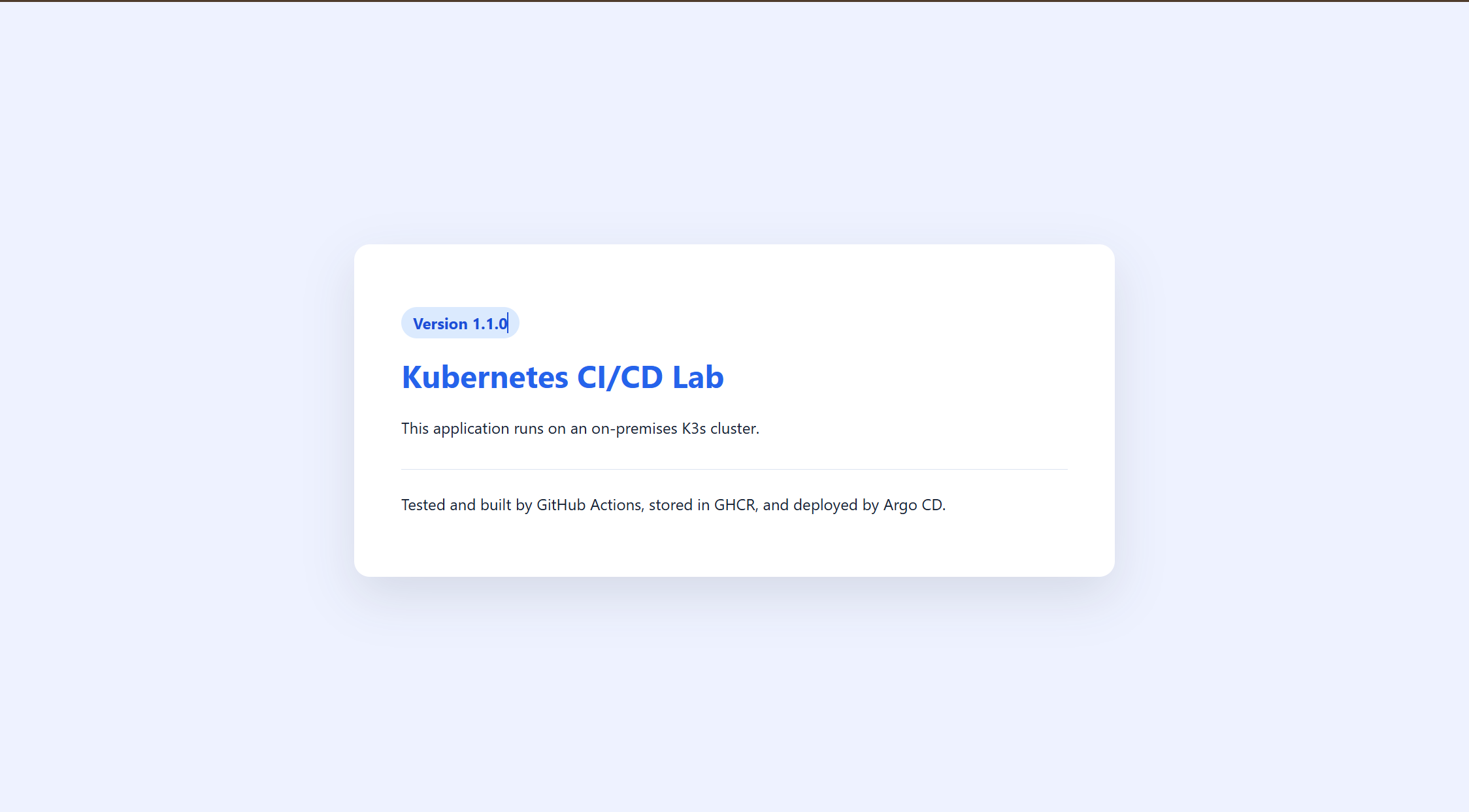
Edit the page on the Debian management VM. The successful test changed the
visible release to v1.1.0 and added styling:
Run the same source test used by CI:
Review and push only the intended application change:
git status
git diff -- app/index.html
git add app/index.html
git commit -m "Update demo app to v1.1.0"
git push origin main
No Kubernetes file was changed manually for this release.
3. Watch GitHub Actions
Open GitHub > k8s-cicd-lab > Actions and select the run for the application commit. Follow the sequence:
- repository checkout
tests/test-app.sh- container build
- temporary container health check against
/healthz - GHCR login with
GITHUB_TOKEN - publish full-SHA and
maintags - update
k8s/deployment.yaml - commit and push the desired image SHA
Both the test and publish jobs must pass. If the test job fails, the publish job must not deploy around it.
After the workflow finishes, confirm the generated commit from the Debian VM:
git pull --ff-only
git log --oneline -n 5
git diff HEAD~1 -- k8s/deployment.yaml
grep -n 'image:' k8s/deployment.yaml
4. Watch Argo CD
On the control-plane node:
Expected transitions can include:
The exact display may move quickly enough to skip one state. In another terminal, follow the Kubernetes rollout:
Because maxSurge is one and maxUnavailable is zero, Kubernetes first tries
to create a new Pod, waits for it to become ready, and only then removes an old
Pod.
5. Validate the completed release
kubectl get deployment demo-app -n demo
kubectl get pods -n demo -o wide
kubectl get application demo-app -n argocd
kubectl get deployment demo-app -n demo \
  -o jsonpath='{.spec.template.spec.containers[0].image}'; echo
The final evidence was:
- Deployment:
2/2ready - Application:
SyncedandHealthy - no Pending Pods
- one current-version Pod on each worker
- the Deployment image matched the SHA committed by CI
Test through the Service from inside Kubernetes:
kubectl run curl-test \
  --namespace demo \
  --image=curlimages/curl:latest \
  --restart=Never \
  --rm \
  -i \
  -- curl -fsS http://demo-app/healthz
Then test the ingress from the Debian VM or VPN-connected laptop:
Refresh http://k8s-demo.home in the browser and confirm that v1.1.0 and the
new styling appear.
6. The failed first rollout
Before the successful application change, one manifest update produced:
The commit SHA in the Deployment matched Git, so Argo CD had applied the desired state correctly. The failure was below Argo CD: Kubernetes could not schedule the temporary surge Pod.
7. Troubleshoot from the top down
Start with the broad status:
kubectl get application demo-app -n argocd -o wide
kubectl describe application demo-app -n argocd
kubectl get deployment,replicaset,pods -n demo -o wide
Identify the Pending Pod:
kubectl get pods -n demo --field-selector=status.phase=Pending
kubectl describe pod <pending-pod-name> -n demo
Then read recent events in time order:
The scheduler evidence showed two constraints:
- the control-plane node had an untolerated
NoScheduletaint - the two worker nodes did not satisfy the strict topology-spread calculation for the new surge Pod
Useful supporting checks were:
kubectl get nodes --show-labels
kubectl describe node k8s-cp-01
kubectl get deployment demo-app -n demo -o yaml
kubectl get replicasets -n demo
kubectl rollout status deployment/demo-app -n demo
Container logs are useful only after a Pod starts. For a Pending Pod, scheduler
events and node constraints are more useful than kubectl logs.
8. Why the scheduler became stuck
The desired steady state was two replicas spread across two workers. During a
rolling update, maxSurge: 1 requested a third temporary Pod while both old
replicas were still present.
The control plane could not run the Pod because of its taint. The original
placement rules did not make the scheduler's eligible topology domains line up
cleanly with the intended worker-only placement, so neither worker was accepted
for the surge Pod under DoNotSchedule.
This explains the apparently contradictory status:
- Argo CD was
Syncedbecause the Deployment object matched Git. - Kubernetes was
Degradedbecause the new ReplicaSet could not become ready.
9. Fix the scheduling intent in Git
The fix was added to k8s/deployment.yaml: the Pod template selects nodes with
the existing worker label:
The complete manifest remains in the application repository, so it is not duplicated here. Review, test, commit, and push the fix from the Debian VM:
git diff -- k8s/deployment.yaml
git add k8s/deployment.yaml
git commit -m "Schedule demo app on worker nodes"
git push origin main
Because this was a deployment-only change, the CI path filter did not build a new application image. Argo CD detected the manifest commit directly and reconciled it.
Watch recovery:
kubectl get application demo-app -n argocd --watch
kubectl rollout status deployment/demo-app -n demo
kubectl get pods -n demo -o wide
The result returned to two ready replicas with one current-version Pod on each worker.
10. Troubleshooting command map
| Question | Command |
|---|---|
| Did Git contain the image? | grep -n 'image:' k8s/deployment.yaml |
| Did Argo read and apply Git? | kubectl describe application demo-app -n argocd |
| Did the Deployment progress? | kubectl rollout status deployment/demo-app -n demo |
| Which ReplicaSet is new? | kubectl get replicasets -n demo |
| Where are Pods running? | kubectl get pods -n demo -o wide |
| Why is a Pod Pending? | kubectl describe pod <pod> -n demo |
| What happened most recently? | kubectl get events -n demo --sort-by='.lastTimestamp' |
| Did the container start? | kubectl logs <pod> -n demo |
| Does the Service have backends? | kubectl get service,endpoints -n demo |
| Does cluster DNS and Service routing work? | temporary curl-test Pod |
| Does ingress work on a chosen node? | curl --resolve k8s-demo.home:80:<node-address> http://k8s-demo.home/healthz |
11. Recovery through Git
The normal GitOps recovery is to restore the previous known-good content in Git, not to make a permanent manual cluster edit. For example, inspect history and create a new revert commit:
git log --oneline -n 10
git show <known-good-commit>:k8s/deployment.yaml
git revert <bad-commit>
git push origin main
Then watch Argo CD and the rollout again. This recovery path is documented but
was not needed for the successful v1.1.0 release.
Avoid relying on a manual kubectl set image as a lasting fix: with self-heal
enabled, Argo CD will eventually restore the image declared in Git.
Completion checks
- An application edit starts GitHub Actions.
- Source and HTTP smoke tests pass.
- GHCR receives the immutable SHA-tagged image.
- CI records the SHA in
k8s/deployment.yaml. - Argo CD detects and applies the manifest commit.
- Kubernetes performs the rolling update.
-
v1.1.0appears through the internal ingress. - A
SyncedbutDegradedrollout is diagnosed through Pod events. - The scheduling correction is made through Git.
Official references
- Kubernetes Deployment rolling updates
- Debug running Pods
- Debug Services
- Pod topology spread constraints
- Argo CD automated sync and self-heal
- GitHub workflow run history
Return to the Kubernetes and Argo CD overview, or read the lessons journal.